
Choosing between M3U playlists and Xtream Codes can shape your entire streaming experience. If you use IPTV services online, the connection method you select affects how quickly you set up your app, how reliably channels load, and how easily you access live TV and on demand content.
Choosing how to connect your IPTV subscription to your player matters more than most viewers realize. The two most popular connection methods, M3U playlists and Xtream Codes, deliver the same channels but handle them in very different ways. Both methods have earned loyal followings among cord cutters.
At HyperView TV, we know that IPTV services online great entertainment depends on both service quality and the connection method you choose. This guide explains how both formats work, where they differ, and which one fits your setup best when using through a reliable provider.
What Are M3U Playlists and Xtream Codes in IPTV?
An M3U playlist is a file or URL that contains a list of media stream links. In IPTV, this playlist tells your player where to find live TV channels, movies, and series. You load the M3U URL into a compatible app, and the player reads the links to display available content.
Xtream Codes is an API based connection method that uses three credentials: a username, a password, and a server URL. Instead of loading a static playlist file, your IPTV app communicates directly with the provider’s server to retrieve channels, program guides, and video on demand libraries.
Both formats are widely supported by modern IPTV players. HyperView TV subscribers can choose the connection method that matches their preferred device, app, and viewing habits for a smooth and personalized streaming experience.
How M3U and Xtream Codes Handle IPTV Streaming
M3U playlists work by delivering a list of stream addresses to your IPTV player. When you select a channel, the player connects to that specific stream URL and begins playback. If the provider updates channels or categories, you may need to refresh or reload the playlist manually.
Xtream Codes operates through a structured API connection. After you enter your credentials, the app authenticates with the server and pulls live channels, VOD content, and EPG data in organized categories. This creates a more dynamic and responsive interface for browsing content.
For viewers using HyperView TV on Smart TVs, Firestick devices, or mobile apps, this difference affects how quickly content loads and how easily you navigate your entertainment. The connection method acts as the bridge between your subscription and your screen.
Key Takeaways Summary
- Best for most users: Xtream Codes offers faster setup, automatic EPG syncing.
- Best for flexibility: M3U playlists work with a wider range of media players and basic streaming apps.
- Streaming quality: Both formats can deliver high quality playback when paired with a reliable provider.
- Ease of use: Xtream Codes requires only a username, password, and server URL.
- Content access: Xtream Codes typically provides smoother access to live TV, program.
Key Differences in Setup and Configuration
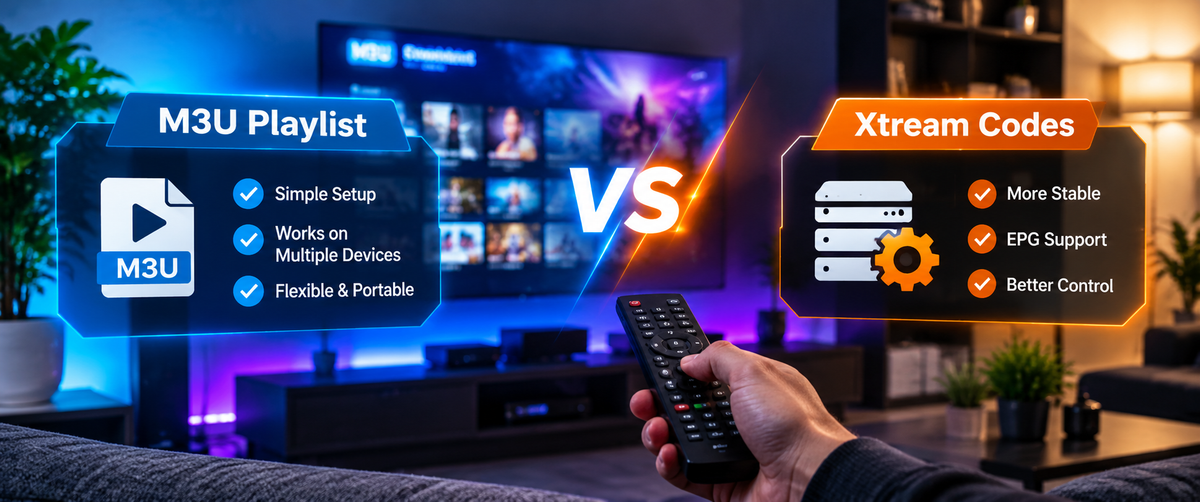
The main difference comes down to how information is delivered to your IPTV player. M3U relies on a playlist structure, while Xtream Codes uses an authenticated API connection. This affects everything from initial setup to daily content browsing.
For beginners, entering three short credentials is usually easier than copying a long playlist URL. Experienced users who prefer manual control may appreciate the simplicity of an M3U file, especially when using basic media players.
Streaming Quality, Speed and Stability Compared
A common question is whether M3U or Xtream Codes delivers better picture quality. The direct answer is that both formats can support HD, Full HD, and 4K streaming when the IPTV provider delivers high quality streams. The format is a delivery method, not a video quality setting.
Where differences appear is in connection stability and loading behavior. Xtream Codes connections often feel smoother because the app maintains an active authenticated session with the server. This can support faster channel switching and more consistent access to content categories.
M3U playlists depend on the player’s ability to read and manage stream links efficiently. With a premium provider like HyperView TV and a stable internet connection, M3U streaming can be equally reliable. Your network speed, device performance, and app quality all play major roles in playback stability.
Channel Access, EPG and VOD Support
Channel access is one of the most noticeable differences between the two formats. M3U playlists can deliver live channels effectively, but organizing them into categories may depend on how the playlist is structured and how the player reads it.
Xtream Codes typically provides a richer content experience. Because it connects through an API, it can neatly separate live TV, movies, series, and catch up content. This makes browsing easier, especially for users with large channel lineups and extensive VOD libraries.
Electronic Program Guide support is another key factor. With M3U, you may need to add a separate EPG URL to view program schedules. Xtream Codes usually pulls EPG data automatically, giving you a complete TV guide with less manual work.
Device Compatibility and App Integration
M3U playlists have a major advantage in compatibility. They work with many media players across Smart TVs, Android devices, iOS devices, computers, and streaming sticks. If you use a basic media player or a less common app, M3U is often the easiest format to load.
Xtream Codes is supported by most popular IPTV apps designed specifically for live TV streaming. Apps on Firestick, Android TV, and mobile devices often provide a dedicated Xtream Codes login screen, making the process quick and easy to follow.
At HyperView TV, subscribers can enjoy a flexible viewing experience across multiple devices. Whether you prefer watching on a Smart TV in your living room or streaming on your phone while traveling, choosing the right format ensures your app and device work together smoothly.
Which Option Offers Easier IPTV Management?
Xtream Codes is generally easier to manage on a daily basis. Once logged in, the app can automatically refresh content categories, update program guides, and organize live channels. This reduces the need for manual adjustments when the provider updates content.
M3U playlists require more manual management in some situations. If your provider changes the playlist structure or EPG source, you may need to update URLs yourself. For users who manage multiple playlists or custom channel groups, this can add extra steps.
For households with multiple users or devices, Xtream Codes offers a cleaner experience. The login based system keeps things simple, while M3U is better suited for users who enjoy customizing their own playlist setup and have specific player preferences.
Common M3U and Xtream Codes Setup Issues
Even with the right format, setup issues can happen. Knowing the common problems helps you fix them quickly and get back to streaming.
Common M3U Issues
- Playlist not loading due to an incorrect or incomplete URL
- Missing EPG because the guide URL was not added separately
- Channels appearing unorganized when the player does not read categories properly
- Playback errors caused by outdated playlist links or an unsupported player
Common Xtream Codes Issues
- Login failure from an incorrect username, password, or server URL
- Server connection errors when the port or protocol is entered incorrectly
- Missing VOD or series categories if the app needs a content refresh
- Authorization issues when too many connections are active at once
Most of these problems are easy to resolve by double checking credentials, updating your IPTV app, and confirming your internet connection is stable. HyperView TV subscribers can also benefit from using recommended IPTV player apps for the smoothest setup experience.
Security, Privacy and Connection Reliability
Security is an important consideration when choosing an IPTV connection method. Xtream Codes uses account based authentication, which means your access is tied to unique credentials. This can provide better control over account usage and active connections.
M3U playlists often contain direct stream URLs. If a playlist URL is shared or exposed, it may be easier for unauthorized users to access the stream. Keeping your playlist private and avoiding public sharing is essential for protecting your subscription.
For reliable and secure streaming, always use trusted IPTV apps, keep your device software updated, and connect through a secure home network. Pairing a dependable service like HyperView TV with good security habits helps protect your viewing experience and personal information.
Choosing the Right IPTV Connection Method
Xtream Codes stands out as the best option for most IPTV users. Its simple login process, automatic content syncing, and organized interface make it the preferred choice for everyday streaming. M3U playlists still hold value, especially for users who need broad player compatibility or want more manual control over their setup.
The best format ultimately depends on your device, your preferred IPTV player, and how much control you want over your setup. No matter which format you choose, pairing it with a dependable provider like HyperView TV helps you enjoy smooth, high quality entertainment across your favorite screens.
Frequently Asked Questions
Is Xtream Codes better than M3U for IPTV?
For most users, yes. Xtream Codes is easier to set up, automatically loads EPG data, and organizes live TV and VOD content more efficiently. M3U is still useful for apps that only support playlist URLs or for users who prefer manual playlist management.
Does M3U or Xtream Codes affect streaming quality?
The format itself does not change video quality. Streaming quality depends on your IPTV provider, internet speed, device performance, and the app you use. Both formats can deliver excellent playback when configured properly with a reliable service.
Can I use both M3U and Xtream Codes on the same device?
Yes, many IPTV apps allow you to add multiple connections. You can test both formats on the same device and keep the one that provides the best experience for your preferred player, channel layout, and viewing habits.
Why is my EPG not working with an M3U playlist?
M3U playlists often require a separate EPG URL. If the guide is missing, check that the EPG link was added correctly, refresh the playlist, and confirm that your IPTV app supports XMLTV guide data. Switching to Xtream Codes can also simplify EPG setup.
Which format is best for Firestick and Smart TV?
Xtream Codes is usually the best choice for Firestick and Smart TV because most popular IPTV apps support API login. It provides faster setup, automatic program guide loading, and better organization for live channels and on demand content.
Closing Thoughts
Choosing between M3U playlists and Xtream Codes comes down to convenience, compatibility, and how you prefer to manage your streaming setup. Xtream Codes offers a modern, easy to use experience with automatic updates and organized content, while M3U playlists provide flexible compatibility for a wide range of players.
For the best results, pair your preferred connection method with a trusted provider. HyperView TV delivers the reliable streaming experience viewers need, whether you are watching live channels, catching up on shows, or exploring a large video on demand library.